
IntegratedDoc.md 36 KB
app集成文档
Android环境配置要求
1、gradle版本推荐4.6以上
2、build tools版本推荐3.2.1以上
获取appKey
AppSp前端创建好应用,将得到唯一的appKey
获取推送key
获取推送所需的appId,appKey,appSecret,MasterSecret
1,如果只需要极光推送,只需要在极光平台获取appKey和MasterSecret
2,如果打开厂商通道,需要在上述步骤基础上,额外在华为开发者平台、小米开发者平台、oppo开发者平台、vivo开发者平台四个平台进行相关配置,从而获取appId,appKey,appSecret,具体配置步骤请看“推送服务说明”。
集成(Android原生)
导入SDK
通过AS将sdk作为module导入项目 导入步骤:AndroidStudio -> File -> New -> Import Module -> 选择 ajpushlibrary 导入
配置SDK
settings.gradle 配置添加:
include ':ajpushlibrary'
添加SDK依赖
在应用 module gradle 中 添加 SDK 依赖
android {
    defaultConfig {
        ......
        applicationId "com.xxx.xxx" //华为、小米、vivo、oppo、极光 上注册的应用包名.
        ......
    }
    ......
}

dependencies {
    ......
    implementation project(path: ':ajpushlibrary')
    ......
}
华为SDK配置
在应用 project gradle 中 添加下载华为SDK的配置
buildscript {
    repositories {
        google()
        jcenter()
        // 添加huawei maven地址
        maven { url 'https://developer.huawei.com/repo/' }

    }
    dependencies {
        classpath 'com.android.tools.build:gradle:3.5.2'
        //添加依赖
        classpath 'com.huawei.agconnect:agcp:1.4.1.300'

    }
}

allprojects {
    repositories {
        google()
        jcenter()
        // 添加huawei maven地址
        maven { url 'https://developer.huawei.com/repo/' }

    }
}

task clean(type: Delete) {
    delete rootProject.buildDir
}
在应用 module gradle 中 使用插件
apply plugin: 'com.huawei.agconnect' //添加华为推送所需配置
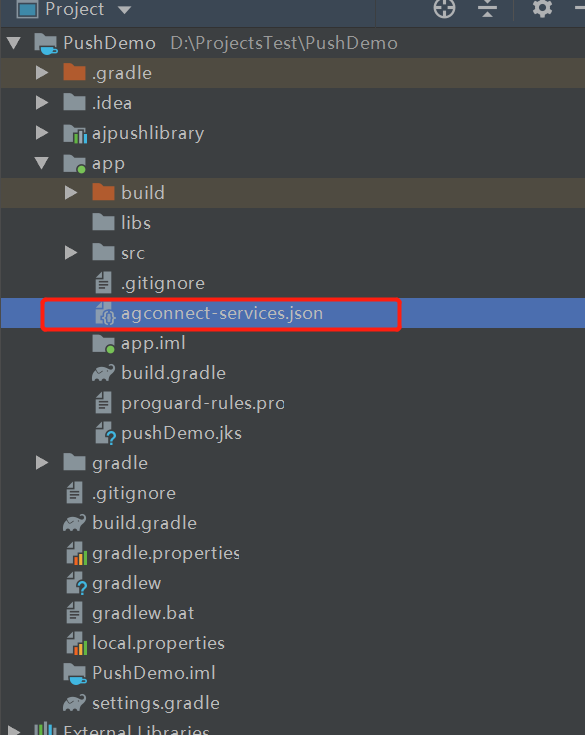
在应用 module 的根目录下添加华为推送配置文件agconnect-services.json
- 在华为开发者平台中下载配置文件“agconnect-services.json”,具体下载地址可查看“推送服务说明-华为”
- 将Android Studio切换到项目视图
- 将“agconnect-services.json”添加到模块根目录下,如下图所示:
其他配置
在应用 module gradle 中 统一配置AppSp、极光、vivo、小米、oppo
.........
 //统一配置
        manifestPlaceholders = [
                "JPUSH_PKGNAME" : applicationId,
                "JPUSH_APPKEY"  : "66c9266fc53b8025cb0dd919", //极光开发平台上注册的包名对应的appkey.
                "JPUSH_CHANNEL" : "developer-default", //暂时填写默认值即可.
                "appspHost"     : "http://uatappsp.anji-plus.com",//push请求的host
                "appspAppKey"   : "fb90cb5bc0c84a50883a3a2cc9295fbf",//为移动服务平台申请的appkey
                "appspSecretKey": "3cfeb0e9f5fd48fab00b4045a9da1f24",//为移动服务平台申请的appkey
                "vivoAppId"     : "105303997",//vivo 厂商通道 appID
                "vivoAppKey"    : "ecaa359c8bbe601d7bbc86d29f5cc58e",//vivo 厂商通道 appKey
                "xmAppId"       : "\\ 2882303761518880022",//小米 厂商通道 appID,记得如果是长数,前面加“\\ ”,有空格
                "xmAppKey"      : "\\ 5161888025022",//小米 厂商通道 appKey,记得如果是长数,前面加“\\ ”,有空格
                "oppoAppKey"    : "c160669462604212962064ffa2df36af",//oppo 厂商通道 appKey
                "oppoAppSecret" : "b77b1509f99043e3b695795366e929ef"//oppo 厂商通道 appSecret
        ]
manifest中配置
在应用 module Andraoidmanifest 中配置
  <activity android:name=".activity.MainActivity">
            <intent-filter>
                <action android:name="android.intent.action.MAIN" />
                <category android:name="android.intent.category.LAUNCHER" />
            </intent-filter>
            <!--华为的过滤条件-->
            <intent-filter>
                <!-- ‘name’值由您自定义 -->
                <action android:name="com.push.demo.internal" />
            </intent-filter>

            <!--vivo的过滤条件-->
            <intent-filter>
                <action android:name="android.intent.action.VIEW" />

                <category android:name="android.intent.category.DEFAULT" />
                <category android:name="android.intent.category.BROWSABLE" />
                <!-- 路径由您自定义 -->
                <data
                    android:host="com.vivo.push.notifysdk"
                    android:path="/detail"
                    android:scheme="vpushscheme" />
            </intent-filter>

            <!--oppo的过滤条件-->
            <intent-filter>
                <!-- ‘name’值由您自定义 -->
                <action android:name="com.push.demo.internal" />
                <category android:name="android.intent.category.DEFAULT" />
            </intent-filter>
        </activity>

        <!-- 配置项 -->
        <meta-data
            android:name="appspHost"
            android:value="${appspHost}" />
        <meta-data
            android:name="appspAppKey"
            android:value="${appspAppKey}" />
        <meta-data
            android:name="appspSecretKey"
            android:value="${appspSecretKey}" />
        <meta-data
            android:name="com.vivo.push.api_key"
            android:value="${vivoAppKey}" />
        <meta-data
            android:name="com.vivo.push.app_id"
            android:value="${vivoAppId}" />
        <meta-data
            android:name="xmAppId"
            android:value="${xmAppId}" />
        <meta-data
            android:name="xmAppKey"
            android:value="${xmAppKey}" />
        <meta-data
            android:name="oppoAppKey"
            android:value="${oppoAppKey}" />
        <meta-data
            android:name="oppoAppSecret"
            android:value="${oppoAppSecret}" />
声音资源存放
建议统一放到res/raw/,声音名称和Web端配置的声音名需一致
混淆
1,module gradle文件加上混淆
 buildTypes {
        release {
            ndk {
                abiFilters "armeabi-v7a"
            }
			//关键代码
            proguardFiles getDefaultProguardFile('proguard-android-optimize.txt'), 'proguard-rules.pro'
            signingConfig signingConfigs.release
        }
        debug {
           ...
        }
    }
2,proguard-rules.pro加上
-keep class com.anji.plus.ajpushlibrary.** {*;}
-dontwarn com.anji.plus.ajpushlibrary.**

-keep class com.huawei.** {*;}
-dontwarn com.huawei.**

-keep class cn.jiguang.** {*;}
-dontwarn cn.jiguang.**

-keep class cn.jpush.** {*;}
-dontwarn cn.jpush.**

-keep class com.heytap.** {*;}
-dontwarn com.heytap.**
代码说明
Application初始化
package com.anji.plus.pushdemo.appplication;

import android.app.Application;
import android.content.Context;
import android.content.pm.ApplicationInfo;
import android.content.pm.PackageManager;

import com.anji.plus.ajpushlibrary.AppSpPushConfig;
import com.anji.plus.ajpushlibrary.AppSpPushLog;
import com.anji.plus.ajpushlibrary.AppSpPushConstant;
import com.anji.plus.ajpushlibrary.http.AppSpPushRequestUrl;
import com.anji.plus.pushdemo.SoundUtils;

/**
 * Copyright © 2018 anji-plus
 * 安吉加加信息技术有限公司
 * http://www.anji-plus.com
 * All rights reserved.
 * <p>
 * Appsp 推送
 * </p>
 */
public class BaseApplication extends Application {
    private Context mContext;

    @Override
    public void onCreate() {
        super.onCreate();
        SoundUtils.init(this);
        mContext = getApplicationContext();
        initConfiguration();
        debugConfiguration();
    }

    ///从build.gradle读取配置
    private void initConfiguration() {
        try {
            ApplicationInfo appInfo = mContext.getPackageManager().getApplicationInfo(mContext.getPackageName(),
                    PackageManager.GET_META_DATA);
            AppSpPushConstant.packageName = mContext.getPackageName();
            AppSpPushRequestUrl.Host = AppSpPushConstant.appspHost = getMetaInfoByKey(appInfo, "appspHost");
            AppSpPushConstant.appspAppKey = getMetaInfoByKey(appInfo, "appspAppKey");
            AppSpPushConstant.appspSecretKey = getMetaInfoByKey(appInfo, "appspSecretKey");
            AppSpPushConstant.oppoAppKey = getMetaInfoByKey(appInfo, "oppoAppKey");
            AppSpPushConstant.oppoAppSecret = getMetaInfoByKey(appInfo, "oppoAppSecret");
            AppSpPushConstant.xmAppId = getMetaInfoByKey(appInfo, "xmAppId");
            AppSpPushConstant.xmAppKey = getMetaInfoByKey(appInfo, "xmAppKey");
        } catch (Exception e) {

        }
        AppSpPushConfig.getInstance().init(mContext, AppSpPushConstant.appspAppKey, AppSpPushConstant.appspSecretKey, AppSpPushRequestUrl.Host + AppSpPushRequestUrl.putPushInfo);
    }

    private String getMetaInfoByKey(ApplicationInfo appInfo, String key) {
        Object value = appInfo.metaData.get(key);
        String valueStr = "";
        if (value != null) {
            valueStr = value.toString().trim();
        }
        return valueStr;
    }

    private void debugConfiguration() {
        AppSpPushLog.d(" AppSpPushRequestUrl.Host " + AppSpPushRequestUrl.Host);
        AppSpPushLog.d(" AppSpPushConstant.packageName " + AppSpPushConstant.packageName);
        AppSpPushLog.d(" AppSpPushConstant.appspAppKey " + AppSpPushConstant.appspAppKey);
        AppSpPushLog.d(" AppSpPushConstant.appspSecretKey " + AppSpPushConstant.appspSecretKey);
        AppSpPushLog.d(" AppSpPushConstant.oppoAppKey " + AppSpPushConstant.oppoAppKey);
        AppSpPushLog.d(" AppSpPushConstant.oppoAppSecret " + AppSpPushConstant.oppoAppSecret);
        AppSpPushLog.d(" AppSpPushConstant.xmAppId " + AppSpPushConstant.xmAppId);
        AppSpPushLog.d(" AppSpPushConstant.xmAppKey " + AppSpPushConstant.xmAppKey);
    }
}
#### 接收消息
MainActivity接收
package com.anji.plus.pushdemo.activity;

import android.content.BroadcastReceiver;
import android.content.Context;
import android.content.DialogInterface;
import android.content.Intent;
import android.content.IntentFilter;
import android.os.Bundle;
import android.widget.Toast;

import androidx.appcompat.app.AlertDialog;
import androidx.appcompat.app.AppCompatActivity;

import com.anji.plus.ajpushlibrary.AppSpPushConstant;
import com.anji.plus.ajpushlibrary.model.NotificationMessageModel;
import com.anji.plus.ajpushlibrary.util.CommonUtil;
import com.anji.plus.pushdemo.R;
import com.anji.plus.pushdemo.SoundUtils;

import org.json.JSONException;
import org.json.JSONObject;

import java.util.Iterator;

/**
 * Copyright © 2018 anji-plus
 * 安吉加加信息技术有限公司
 * http://www.anji-plus.com
 * All rights reserved.
 * <p>
 * 推送入口页面
 * </p>
 */
public class MainActivity extends AppCompatActivity {
    private MessageReceiver mMessageReceiver;

    @Override
    protected void onCreate(Bundle savedInstanceState) {
        super.onCreate(savedInstanceState);
        setContentView(R.layout.activity_main);
        //注册接收透传消息的广播
        register();
    }

    private void register() {
        mMessageReceiver = new MessageReceiver();
        IntentFilter filter = new IntentFilter();
        filter.setPriority(IntentFilter.SYSTEM_HIGH_PRIORITY);
        filter.addAction(AppSpPushConstant.MESSAGE_RECEIVED_ACTION);
        registerReceiver(mMessageReceiver, filter);
    }

    @Override
    protected void onDestroy() {
        super.onDestroy();
        unregisterReceiver(mMessageReceiver);
    }

    //接收透传消息的广播
    private class MessageReceiver extends BroadcastReceiver {

        @Override
        public void onReceive(final Context context, Intent intent) {
            try {
                if (AppSpPushConstant.MESSAGE_RECEIVED_ACTION.equals(intent.getAction())) {
                    Bundle bundle = intent.getExtras();
                    NotificationMessageModel notificationMessageModel = (NotificationMessageModel) bundle.getSerializable(AppSpPushConstant.HNOTIFICATIONMESSAGE);
                    final String title = notificationMessageModel.getTitle();
                    String messge = notificationMessageModel.getContent();
                    final String extras = notificationMessageModel.getNotificationExtras();
                    final StringBuilder showMsg = new StringBuilder();
                    showMsg.append(messge + "\n");
                    if (!CommonUtil.isEmpty(extras)) {
                        showMsg.append("extras: " + extras + "\n");
                    }
                    runOnUiThread(new Runnable() {
                        @Override
                        public void run() {
                            buildDialog(title, showMsg.toString());
                            soundPlay(extras);
                        }
                    });
                }
            } catch (Exception e) {
            }
        }

        private void soundPlay(String extras) {
            //获取推送消息中的sound的值,注意sound时与后端协商好的传送声音类型的key,如果后端改变key,此处也随之改变
            JSONObject json = null;
            String soundType = "";//从推送消息中获取的播放的声音类型
            try {
                json = new JSONObject(extras);
                Iterator it = json.keys();
                while (it.hasNext()) {
                    String key = (String) it.next();
                    if (key.equals("sound")) {
                        soundType = json.get(key).toString();
                    }
                }
            } catch (JSONException e) {
                e.printStackTrace();
            }
            //根据后端传来的数据值决定播放哪个声音
            switch (soundType) {
                case "hua_notice":
                    SoundUtils.play(1);
                    break;
                default:
                    SoundUtils.play(2);
            }
        }
    }

    private void buildDialog(String title, String msg) {
        AlertDialog.Builder builder;
        builder = new AlertDialog.Builder(this).setIcon(R.mipmap.ic_launcher).setTitle(title)
                .setMessage(msg).setPositiveButton("确定", new DialogInterface.OnClickListener() {
                    @Override
                    public void onClick(DialogInterface dialog, int which) {
                        Toast.makeText(MainActivity.this, "确定按钮", Toast.LENGTH_LONG).show();
                    }
                }).setNegativeButton("取消", new DialogInterface.OnClickListener() {
                    @Override
                    public void onClick(DialogInterface dialogInterface, int i) {
                        Toast.makeText(MainActivity.this, "关闭按钮", Toast.LENGTH_LONG).show();
                        dialogInterface.dismiss();
                    }
                });
        builder.create().show();
    }


}
集成(iOS原生)
导入SDK
将AJPushSDK 代码导入项目
添加SDK依赖
'JCore', '2.1.4-noidfa'
'JPush', '3.2.4-noidfa'
在应用中初始化配置信息
.........

#define APPSP_APPKEY @"3fffc7ab4e704965b3d7ebc034addef7" //appsp推送 uat服务key
#define APPSP_SECRETKEY @"12d606b4ab5b496992c48048e2a035f1" //appsp推送 uat服务Secret Key
#define JG_APPKEY @"66c9266fc53b8025cb0dd919" //极光推送服务key
#define JG_CHANNEL @"App Store" //极光推送通道
#define JG_IS_PRODUCTION 0 //0(默认值)表示采用的是开发证书,1 表示采用生产证书发布应用。
#define AppSpTestURL @"https://openappsp.anji-plus.com" //uat

 - (void)initSettingData {
    if([SettingManager getJPushKey] == nil) {
        [SettingManager setJPushKey:JG_APPKEY];
    }
    if([SettingManager getAppSpKey] == nil) {
        [SettingManager setAppSpKey:APPSP_APPKEY];
    }
    if ([SettingManager getAppSpUrl] == nil) {
        [SettingManager setAppSpUrl:AppSpTestURL];
    }
    if ([SettingManager getAppSpSecretKey] == nil) {
        [SettingManager setAppSpSecretKey:APPSP_SECRETKEY];
    }
}
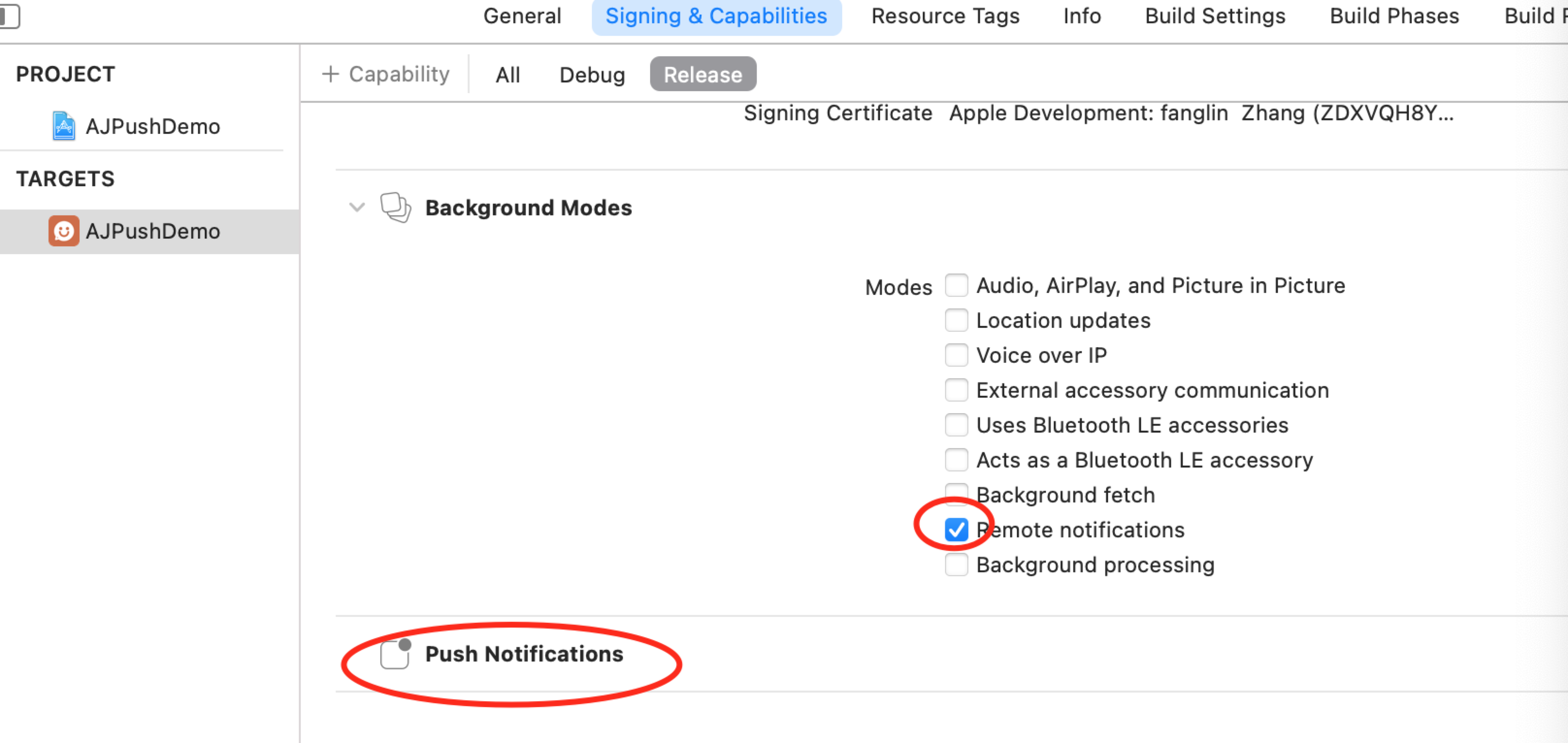
应用中权限配置
Targets-Signing & Capabilities
声音资源存放
放到工程下,声音名称和Web端配置的声音名需一致
代码说明
AppDelegate初始化
//初始化配置信息
[self initSettingData];
//初始化推送服务
[self initAPNSWithOptions:launchOptions];

//注册 APNs 成功并上报 DeviceToken
- (void)application:(UIApplication *)application didRegisterForRemoteNotificationsWithDeviceToken:(NSData *)deviceToken {
    NSLog(@"++application didRegisterForRemoteNotificationsWithDeviceToken");
    [[AJPushService shareService] registerDeviceToken:deviceToken withUrl:[SettingManager getAppSpUrl]];
}

//实现注册 APNs 失败接口
- (void)application:(UIApplication *)application didFailToRegisterForRemoteNotificationsWithError:(NSError *)error {
    //Optional
    NSLog(@"++did Fail To Register For Remote Notifications With Error: %@", error);
}

//初始化配置信息
- (void)initSettingData {
    if([SettingManager getJPushKey] == nil) {
        [SettingManager setJPushKey:JG_APPKEY];
    }
    if([SettingManager getAppSpKey] == nil) {
        [SettingManager setAppSpKey:APPSP_APPKEY];
    }
    if ([SettingManager getAppSpUrl] == nil) {
        [SettingManager setAppSpUrl:AppSpTestURL];
    }
    if ([SettingManager getAppSpSecretKey] == nil) {
        [SettingManager setAppSpSecretKey:APPSP_SECRETKEY];
    }
}

//初始化推送服务
- (void)initAPNSWithOptions:(NSDictionary *)launchOptions {
    [[AJPushService shareService] registerJPushOption:launchOptions appKey:[SettingManager getJPushKey] ajAppKey:[SettingManager getAppSpKey] channel:JG_CHANNEL apsForProduction:JG_IS_PRODUCTION];
}
#### 接收消息
ViewController接收
 //注册推送通知中心 方法中处理推送操作。
- (void)initNSNotificationCenter {
    NSNotificationCenter *defaultCenter = [NSNotificationCenter defaultCenter];
    [defaultCenter addObserver:self
                      selector:@selector(noticeBarMessage:)
                          name:kAJPushServiceNoticeBarMessageNotification
                        object:nil];
    [defaultCenter addObserver:self
                      selector:@selector(innerMessage:)
                          name:kAJPushServiceInnerMessageNotification
                        object:nil];
    [defaultCenter addObserver:self
                      selector:@selector(customMessage:)
                          name:kAJPushServiceCustomMessageNotification
                        object:nil];
}
集成(Flutter-Android)
华为SDK配置(原生)
在应用 project gradle 中 添加下载华为SDK的配置
buildscript {
    repositories {
        google()
        jcenter()
        // 添加huawei maven地址
        maven { url 'https://developer.huawei.com/repo/' }

    }
    dependencies {
        classpath 'com.android.tools.build:gradle:3.5.2'
        //添加依赖
        classpath 'com.huawei.agconnect:agcp:1.4.1.300'

    }
}

allprojects {
    repositories {
        google()
        jcenter()
        // 添加huawei maven地址
        maven { url 'https://developer.huawei.com/repo/' }

    }
}

task clean(type: Delete) {
    delete rootProject.buildDir
}
在应用 module gradle 中 使用插件
apply plugin: 'com.huawei.agconnect' //添加华为推送所需配置
在应用 module 的根目录下添加华为推送配置文件agconnect-services.json
- 在华为开发者平台中下载配置文件“agconnect-services.json”,具体下载地址可查看“推送服务说明-华为”
- 将Android Studio切换到项目视图
- 将“agconnect-services.json”添加到模块根目录下,如下图所示:
其他配置(原生)
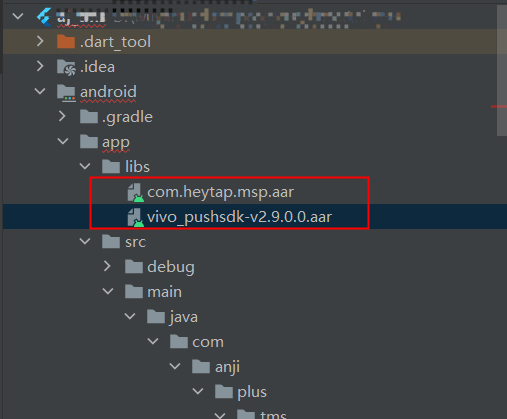
将com.heytap.msp.aar和vivo_pushsdk-v2.9.0.0.aar放到libs下
在module gradle下引用
	//关键
    repositories {
        flatDir {
            dirs 'libs'
        }
    }
}

flutter {
    source '../..'
}

//关键
dependencies {
    api fileTree(dir: 'libs', include: ['*.jar'])
    api fileTree(dir: 'libs', include: ['*.aar'])
}
在应用 module gradle 中 统一配置AppSp、极光、vivo、小米、oppo
.........
 //统一配置
        manifestPlaceholders = [
                "JPUSH_PKGNAME" : applicationId,
                "JPUSH_APPKEY"  : "66c9266fc53b8025cb0dd919", //极光开发平台上注册的包名对应的appkey.
                "JPUSH_CHANNEL" : "developer-default", //暂时填写默认值即可.
                "appspHost"     : "http://uatappsp.anji-plus.com",//push请求的host
                "appspAppKey"   : "fb90cb5bc0c84a50883a3a2cc9295fbf",//为移动服务平台申请的appkey
                "appspSecretKey": "3cfeb0e9f5fd48fab00b4045a9da1f24",//为移动服务平台申请的appkey
                "vivoAppId"     : "105303997",//vivo 厂商通道 appID
                "vivoAppKey"    : "ecaa359c8bbe601d7bbc86d29f5cc58e",//vivo 厂商通道 appKey
                "xmAppId"       : "\\ 2882303761518880022",//小米 厂商通道 appID,记得如果是长数,前面加“\\ ”,有空格
                "xmAppKey"      : "\\ 5161888025022",//小米 厂商通道 appKey,记得如果是长数,前面加“\\ ”,有空格
                "oppoAppKey"    : "c160669462604212962064ffa2df36af",//oppo 厂商通道 appKey
                "oppoAppSecret" : "b77b1509f99043e3b695795366e929ef"//oppo 厂商通道 appSecret
        ]
AndroidManifest.xml配置如下
	<activity
            android:name=".MainActivity"
            android:configChanges="orientation|keyboardHidden|keyboard|screenSize|smallestScreenSize|locale|layoutDirection|fontScale|screenLayout|density|uiMode"
            android:hardwareAccelerated="true"
            android:launchMode="singleTop"
            android:theme="@style/LaunchTheme"
            android:windowSoftInputMode="adjustResize">
            <!-- Specifies an Android theme to apply to this Activity as soon as
                 the Android process has started. This theme is visible to the user
                 while the Flutter UI initializes. After that, this theme continues
                 to determine the Window background behind the Flutter UI. -->
            <intent-filter>
                <action android:name="android.intent.action.MAIN" />
                <category android:name="android.intent.category.LAUNCHER" />
            </intent-filter>
            <!-- Displays an Android View that continues showing the launch screen
                 Drawable until Flutter paints its first frame, then this splash
                 screen fades out. A splash screen is useful to avoid any visual
                 gap between the end of Android's launch screen and the painting of
                 Flutter's first frame. -->
            <meta-data
                android:name="io.flutter.embedding.android.SplashScreenDrawable"
                android:resource="@drawable/launch_background" />
            <meta-data
                android:name="io.flutter.embedding.android.NormalTheme"
                android:resource="@style/NormalTheme" />
            <!--华为的过滤条件-->
            <intent-filter>
                <!-- ‘name’值由您自定义 -->
                <action android:name="com.push.demo.internal" />
            </intent-filter>

            <!--vivo的过滤条件-->
            <intent-filter>
                <action android:name="android.intent.action.VIEW" />

                <category android:name="android.intent.category.DEFAULT" />
                <category android:name="android.intent.category.BROWSABLE" />
                <!-- 路径由您自定义 -->
                <data
                    android:host="com.vivo.push.notifysdk"
                    android:path="/detail"
                    android:scheme="vpushscheme" />
            </intent-filter>

            <!--oppo的过滤条件-->
            <intent-filter>
                <!-- ‘name’值由您自定义 -->
                <action android:name="com.push.demo.internal" />
                <category android:name="android.intent.category.DEFAULT" />
            </intent-filter>
        </activity>

        <!-- 应用在开放平台申请的app_key -->
        <meta-data
            android:name="appspHost"
            android:value="${appspHost}" />
        <meta-data
            android:name="appspAppKey"
            android:value="${appspAppKey}" />
        <meta-data
            android:name="appspSecretKey"
            android:value="${appspSecretKey}" />
        <meta-data
            android:name="com.vivo.push.api_key"
            android:value="${vivoAppKey}" />
        <meta-data
            android:name="com.vivo.push.app_id"
            android:value="${vivoAppId}" />
        <meta-data
            android:name="xmAppId"
            android:value="${xmAppId}" />
        <meta-data
            android:name="xmAppKey"
            android:value="${xmAppKey}" />
        <meta-data
            android:name="oppoAppKey"
            android:value="${oppoAppKey}" />
        <meta-data
            android:name="oppoAppSecret"
            android:value="${oppoAppSecret}" />
混淆(原生)
1,module gradle文件加上混淆
 buildTypes {
        release {
            ndk {
                abiFilters "armeabi-v7a"
            }
			//关键代码
            proguardFiles getDefaultProguardFile('proguard-android-optimize.txt'), 'proguard-rules.pro'
            signingConfig signingConfigs.release
        }
        debug {
           ...
        }
    }
2,proguard-rules.pro加上
-keep class com.anji.plus.ajpushlibrary.** {*;}
-dontwarn com.anji.plus.ajpushlibrary.**

-keep class com.huawei.** {*;}
-dontwarn com.huawei.**

-keep class cn.jiguang.** {*;}
-dontwarn cn.jiguang.**

-keep class cn.jpush.** {*;}
-dontwarn cn.jpush.**

-keep class com.heytap.** {*;}
-dontwarn com.heytap.**
pubspec.yaml依赖(Flutter)
push插件我们放在了appsp/sdk/flutter/push
   aj_flutter_appsp_push:
    git:
      url: https://gitee.com/anji-plus/aj_flutter_plugins.git
      path: aj_flutter_appsp_push
安装插件(Flutter)
flutter packages get
使用(Flutter)
import 'dart:convert';

import 'package:aj_flutter_appsp_push/aj_flutter_appsp_push.dart';
///如果不需要播放声音,可自行删减
import 'package:audioplayers/audio_cache.dart';
import 'package:audioplayers/audioplayers.dart';
import 'package:flutter/material.dart';
import 'package:flutter/services.dart';

import 'message_display_second_page.dart';
import 'notification_message_model.dart';
import 'payload_model.dart';

class MessageDisplayPage extends StatefulWidget {
  MessageDisplayPage({Key key}) : super(key: key);

  @override
  State<StatefulWidget> createState() {
    return new _MessageDisplayPageState();
  }
}

class _MessageDisplayPageState extends State<MessageDisplayPage> {
  String _result = 'getPayloadResult';
  AudioCache audioCache = AudioCache();
  static OverlayEntry entry;
  NotificationMessageModel model;
  AjFlutterAppspPush pushPlugin = new AjFlutterAppspPush();

  @override
  void initState() {
    super.initState();
    _initPlugin();
  }

  _initPlugin() async {
    try {
      pushPlugin.getMessageArrivedCallback((result) {
        print('getMessageArrivedCallback getResult ${result}');
        setState(() {
          _result = result;
        });
        _convertMessageToModel();
      });
    } on PlatformException {
      print('PlatformException');
    }

    try {
      pushPlugin.getMessageClickCallback((result) {
        print('getMessageClickCallback getResult ${result}');
        setState(() {
          _result = result;
        });
        _convertMessageToModel();
      });
    } on PlatformException {
      print('PlatformException');
    }
  }

  //弹出对话框
  _showaAlertDialog(NotificationMessageModel model) {
    entry?.remove();
    entry = null;
    entry = OverlayEntry(builder: (context) {
      return AlertDialog(
        title: Text(
          model.title ?? "",
          style: TextStyle(color: Color(0xFF333333)),
        ),
        content: Text(
          model.content ?? "",
          style: TextStyle(color: Color(0xFF333333)),
        ),
        actions: <Widget>[
          TextButton(
              child: Text(
                '取消',
                style: TextStyle(color: Color(0xFF5b74FF)),
              ),
              onPressed: () {
                entry?.remove();
                entry = null;
              }),
          TextButton(
              child: Text(
                  '确定',
                  style: TextStyle(color: Color(0xFF5b74FF)),
                 ),
              onPressed: () {
                entry?.remove();
                entry = null;
              })
        ],
      );
    });
    Overlay.of(context).insert(entry);
  }

   ///把透传消息子串转成对象
  _convertMessageToModel() {
    print('_convertMessageToModel _result $_result');
    NotificationMessageModel model = NotificationMessageModel.fromJson(json.decode(_result));
    String soundName = json.encode(model.notificationExtras);
    soundName = soundName.replaceAll("\\", "");
    soundName = soundName.replaceAll("\"{", "{");
    soundName = soundName.replaceAll("}\"", "}");
    if (soundName != null &&
        soundName.isNotEmpty && soundName != "{}") {
      PayloadModel payloadModel = PayloadModel.fromJson(json.decode(soundName));
      print('payloadModel.sound ${payloadModel.sound}');
      String music =  payloadModel.sound ?? "";
      if (music.isNotEmpty) {
        audioCache.play((payloadModel.sound ?? "") + '.mp3',
            mode: PlayerMode.LOW_LATENCY);
      }
    }

    print('_convertMessageToModel model $model');
    _showaAlertDialog(model);
  }

  @override
  Widget build(BuildContext context) {
    print("MessageDisplayPage build ");
    return Scaffold(
        body: Center(
            child: InkWell(
              child: Text('当前是演示页面,点击跳转到新页面'),
              onTap: () {
                Navigator.of(context).push(MaterialPageRoute(
                  builder: (context) {
                    return MessageDisplaySecondPage();
                  },
                ));
              },
            )));
  }
}
播放声音(Flutter)
pubspec.yaml依赖声音播放插件
audioplayers: ^0.16.1
pubspec.yaml配置声音资源
flutter:

  # 确保材质图标的字体是包含在您的应用程序中,以便您可以使用的图标
  uses-material-design: true

  #静态资源 图片 json等
  assets:
    - assets/
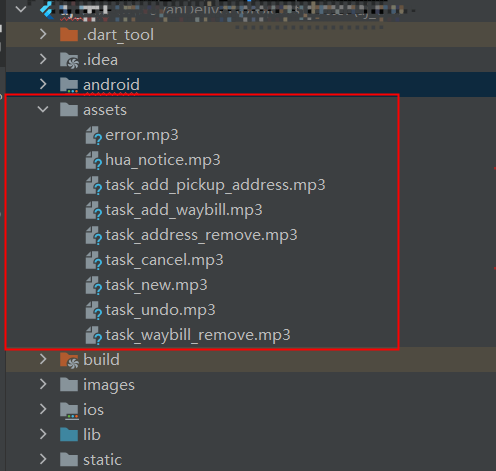
在assets加入资源文件
集成(Flutter-iOS)
AJPush.plist的新增和配置(原生)

应用中权限配置
Targets-Signing & Capabilities
pubspec.yaml依赖(Flutter)
push插件我们放在了appsp/sdk/flutter/push
   aj_flutter_appsp_push:
    git:
      url: https://gitee.com/anji-plus/aj_flutter_plugins.git
      path: aj_flutter_appsp_push
安装插件(Flutter)
flutter packages get
使用(Flutter)
import 'dart:convert';

import 'package:aj_flutter_appsp_push/aj_flutter_appsp_push.dart';
///如果不需要播放声音,可自行删减
import 'package:audioplayers/audio_cache.dart';
import 'package:audioplayers/audioplayers.dart';
import 'package:flutter/material.dart';
import 'package:flutter/services.dart';

import 'message_display_second_page.dart';
import 'notification_message_model.dart';
import 'payload_model.dart';

class MessageDisplayPage extends StatefulWidget {
  MessageDisplayPage({Key key}) : super(key: key);

  @override
  State<StatefulWidget> createState() {
    return new _MessageDisplayPageState();
  }
}

class _MessageDisplayPageState extends State<MessageDisplayPage> {
  String _result = 'getPayloadResult';
  AudioCache audioCache = AudioCache();
  static OverlayEntry entry;
  NotificationMessageModel model;
  AjFlutterAppspPush pushPlugin = new AjFlutterAppspPush();

  @override
  void initState() {
    super.initState();
    _initPlugin();
  }

  _initPlugin() async {
    try {
      pushPlugin.getMessageArrivedCallback((result) {
        print('getMessageArrivedCallback getResult ${result}');
        setState(() {
          _result = result;
        });
        _convertMessageToModel();
      });
    } on PlatformException {
      print('PlatformException');
    }

    try {
      pushPlugin.getMessageClickCallback((result) {
        print('getMessageClickCallback getResult ${result}');
        setState(() {
          _result = result;
        });
        _convertMessageToModel();
      });
    } on PlatformException {
      print('PlatformException');
    }
  }

  //弹出对话框
  _showaAlertDialog(NotificationMessageModel model) {
    entry?.remove();
    entry = null;
    entry = OverlayEntry(builder: (context) {
      return AlertDialog(
        title: Text(
          model.title ?? "",
          style: TextStyle(color: Color(0xFF333333)),
        ),
        content: Text(
          model.content ?? "",
          style: TextStyle(color: Color(0xFF333333)),
        ),
        actions: <Widget>[
          TextButton(
              child: Text(
                '取消',
                style: TextStyle(color: Color(0xFF5b74FF)),
              ),
              onPressed: () {
                entry?.remove();
                entry = null;
              }),
          TextButton(
              child: Text(
                  '确定',
                  style: TextStyle(color: Color(0xFF5b74FF)),
                 ),
              onPressed: () {
                entry?.remove();
                entry = null;
              })
        ],
      );
    });
    Overlay.of(context).insert(entry);
  }

   ///把透传消息子串转成对象
  _convertMessageToModel() {
    print('_convertMessageToModel _result $_result');
    NotificationMessageModel model = NotificationMessageModel.fromJson(json.decode(_result));
    String soundName = json.encode(model.notificationExtras);
    soundName = soundName.replaceAll("\\", "");
    soundName = soundName.replaceAll("\"{", "{");
    soundName = soundName.replaceAll("}\"", "}");
    if (soundName != null &&
        soundName.isNotEmpty && soundName != "{}") {
      PayloadModel payloadModel = PayloadModel.fromJson(json.decode(soundName));
      print('payloadModel.sound ${payloadModel.sound}');
      String music =  payloadModel.sound ?? "";
      if (music.isNotEmpty) {
        audioCache.play((payloadModel.sound ?? "") + '.mp3',
            mode: PlayerMode.LOW_LATENCY);
      }
    }

    print('_convertMessageToModel model $model');
    _showaAlertDialog(model);
  }

  @override
  Widget build(BuildContext context) {
    print("MessageDisplayPage build ");
    return Scaffold(
        body: Center(
            child: InkWell(
              child: Text('当前是演示页面,点击跳转到新页面'),
              onTap: () {
                Navigator.of(context).push(MaterialPageRoute(
                  builder: (context) {
                    return MessageDisplaySecondPage();
                  },
                ));
              },
            )));
  }
}
播放声音(Flutter)
pubspec.yaml依赖声音播放插件
audioplayers: ^0.16.1
pubspec.yaml配置声音资源
flutter:

  # 确保材质图标的字体是包含在您的应用程序中,以便您可以使用的图标
  uses-material-design: true

  #静态资源 图片 json等
  assets:
    - assets/
在assets加入资源文件