# app集成文档
## Android环境配置要求
1、gradle版本推荐4.6以上
2、build tools版本推荐3.2.1以上
## 获取appKey
AppSp前端创建好应用,将得到唯一的appKey
## 获取推送key
获取推送所需的`appId`,`appKey`,`appSecret`,`MasterSecret`
1,如果只需要极光推送,只需要在极光平台获取appKey和MasterSecret
2,如果打开厂商通道,需要在上述步骤基础上,额外在华为开发者平台、小米开发者平台、oppo开发者平台、vivo开发者平台四个平台进行相关配置,从而获取appId,appKey,appSecret,具体配置步骤请看“推送服务说明”。
## 集成(Android原生)
### 导入SDK
通过AS将sdk作为module导入项目
导入步骤:AndroidStudio -> File -> New -> Import Module -> 选择 ajpushlibrary 导入
### 配置SDK
settings.gradle 配置添加:
```json
include ':ajpushlibrary'
```
### 添加SDK依赖
`在应用 module gradle 中 添加 SDK 依赖`
```json
android {
defaultConfig {
......
applicationId "com.xxx.xxx" //华为、小米、vivo、oppo、极光 上注册的应用包名.
......
}
......
}
dependencies {
......
implementation project(path: ':ajpushlibrary')
......
}
```
### 华为SDK配置
`在应用 project gradle 中 添加下载华为SDK的配置`
``` json
buildscript {
repositories {
google()
jcenter()
// 添加huawei maven地址
maven { url 'https://developer.huawei.com/repo/' }
}
dependencies {
classpath 'com.android.tools.build:gradle:3.5.2'
//添加依赖
classpath 'com.huawei.agconnect:agcp:1.4.1.300'
}
}
allprojects {
repositories {
google()
jcenter()
// 添加huawei maven地址
maven { url 'https://developer.huawei.com/repo/' }
}
}
task clean(type: Delete) {
delete rootProject.buildDir
}
```
`在应用 module gradle 中 使用插件`
``` json
apply plugin: 'com.huawei.agconnect' //添加华为推送所需配置
```
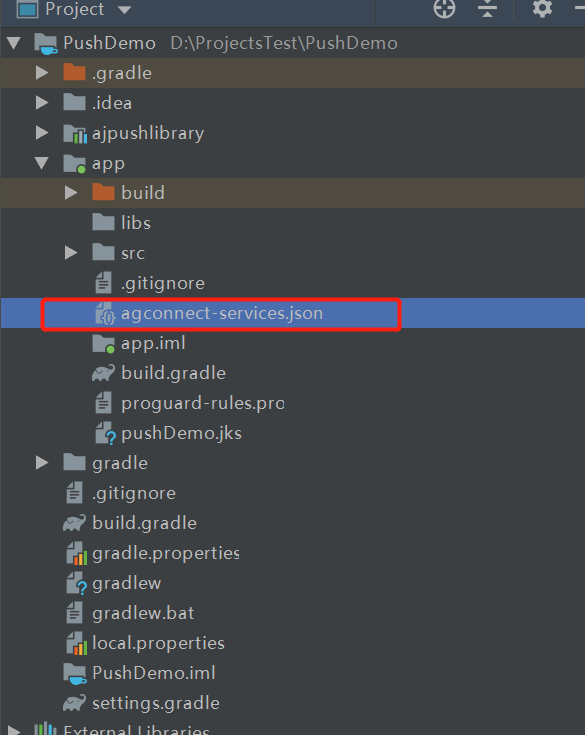
`在应用 module 的根目录下添加华为推送配置文件agconnect-services.json`
- 在华为开发者平台中下载配置文件“agconnect-services.json”,具体下载地址可查看“推送服务说明-华为”
- 将Android Studio切换到项目视图
- 将“agconnect-services.json”添加到模块根目录下,如下图所示:
### 其他配置
`在应用 module gradle 中 统一配置AppSp、极光、vivo、小米、oppo `
``` json
.........
//统一配置
manifestPlaceholders = [
"JPUSH_PKGNAME" : applicationId,
"JPUSH_APPKEY" : "66c9266fc53b8025cb0dd919", //极光开发平台上注册的包名对应的appkey.
"JPUSH_CHANNEL" : "developer-default", //暂时填写默认值即可.
"appspHost" : "http://uatappsp.anji-plus.com",//push请求的host
"appspAppKey" : "fb90cb5bc0c84a50883a3a2cc9295fbf",//为移动服务平台申请的appkey
"appspSecretKey": "3cfeb0e9f5fd48fab00b4045a9da1f24",//为移动服务平台申请的appkey
"vivoAppId" : "105303997",//vivo 厂商通道 appID
"vivoAppKey" : "ecaa359c8bbe601d7bbc86d29f5cc58e",//vivo 厂商通道 appKey
"xmAppId" : "\\ 2882303761518880022",//小米 厂商通道 appID,记得如果是长数,前面加“\\ ”,有空格
"xmAppKey" : "\\ 5161888025022",//小米 厂商通道 appKey,记得如果是长数,前面加“\\ ”,有空格
"oppoAppKey" : "c160669462604212962064ffa2df36af",//oppo 厂商通道 appKey
"oppoAppSecret" : "b77b1509f99043e3b695795366e929ef"//oppo 厂商通道 appSecret
]
```
### manifest中配置
`在应用 module Andraoidmanifest 中配置`
``` json
```
### 声音资源存放
`建议统一放到res/raw/,声音名称和Web端配置的声音名需一致`
### 混淆
1,`module gradle文件加上混淆`
```
buildTypes {
release {
ndk {
abiFilters "armeabi-v7a"
}
//关键代码
proguardFiles getDefaultProguardFile('proguard-android-optimize.txt'), 'proguard-rules.pro'
signingConfig signingConfigs.release
}
debug {
...
}
}
```
2,`proguard-rules.pro加上`
```json
-keep class com.anji.plus.ajpushlibrary.** {*;}
-dontwarn com.anji.plus.ajpushlibrary.**
-keep class com.huawei.** {*;}
-dontwarn com.huawei.**
-keep class cn.jiguang.** {*;}
-dontwarn cn.jiguang.**
-keep class cn.jpush.** {*;}
-dontwarn cn.jpush.**
-keep class com.heytap.** {*;}
-dontwarn com.heytap.**
```
### 代码说明
#### Application初始化
```java
package com.anji.plus.pushdemo.appplication;
import android.app.Application;
import android.content.Context;
import android.content.pm.ApplicationInfo;
import android.content.pm.PackageManager;
import com.anji.plus.ajpushlibrary.AppSpPushConfig;
import com.anji.plus.ajpushlibrary.AppSpPushLog;
import com.anji.plus.ajpushlibrary.AppSpPushConstant;
import com.anji.plus.ajpushlibrary.http.AppSpPushRequestUrl;
import com.anji.plus.pushdemo.SoundUtils;
/**
* Copyright © 2018 anji-plus
* 安吉加加信息技术有限公司
* http://www.anji-plus.com
* All rights reserved.
*
* Appsp 推送
*
*/
public class BaseApplication extends Application {
private Context mContext;
@Override
public void onCreate() {
super.onCreate();
SoundUtils.init(this);
mContext = getApplicationContext();
initConfiguration();
debugConfiguration();
}
///从build.gradle读取配置
private void initConfiguration() {
try {
ApplicationInfo appInfo = mContext.getPackageManager().getApplicationInfo(mContext.getPackageName(),
PackageManager.GET_META_DATA);
AppSpPushConstant.packageName = mContext.getPackageName();
AppSpPushRequestUrl.Host = AppSpPushConstant.appspHost = getMetaInfoByKey(appInfo, "appspHost");
AppSpPushConstant.appspAppKey = getMetaInfoByKey(appInfo, "appspAppKey");
AppSpPushConstant.appspSecretKey = getMetaInfoByKey(appInfo, "appspSecretKey");
AppSpPushConstant.oppoAppKey = getMetaInfoByKey(appInfo, "oppoAppKey");
AppSpPushConstant.oppoAppSecret = getMetaInfoByKey(appInfo, "oppoAppSecret");
AppSpPushConstant.xmAppId = getMetaInfoByKey(appInfo, "xmAppId");
AppSpPushConstant.xmAppKey = getMetaInfoByKey(appInfo, "xmAppKey");
} catch (Exception e) {
}
AppSpPushConfig.getInstance().init(mContext, AppSpPushConstant.appspAppKey, AppSpPushConstant.appspSecretKey, AppSpPushRequestUrl.Host + AppSpPushRequestUrl.putPushInfo);
}
private String getMetaInfoByKey(ApplicationInfo appInfo, String key) {
Object value = appInfo.metaData.get(key);
String valueStr = "";
if (value != null) {
valueStr = value.toString().trim();
}
return valueStr;
}
private void debugConfiguration() {
AppSpPushLog.d(" AppSpPushRequestUrl.Host " + AppSpPushRequestUrl.Host);
AppSpPushLog.d(" AppSpPushConstant.packageName " + AppSpPushConstant.packageName);
AppSpPushLog.d(" AppSpPushConstant.appspAppKey " + AppSpPushConstant.appspAppKey);
AppSpPushLog.d(" AppSpPushConstant.appspSecretKey " + AppSpPushConstant.appspSecretKey);
AppSpPushLog.d(" AppSpPushConstant.oppoAppKey " + AppSpPushConstant.oppoAppKey);
AppSpPushLog.d(" AppSpPushConstant.oppoAppSecret " + AppSpPushConstant.oppoAppSecret);
AppSpPushLog.d(" AppSpPushConstant.xmAppId " + AppSpPushConstant.xmAppId);
AppSpPushLog.d(" AppSpPushConstant.xmAppKey " + AppSpPushConstant.xmAppKey);
}
}
```
#### 接收消息
`MainActivity接收`
``` java
package com.anji.plus.pushdemo.activity;
import android.content.BroadcastReceiver;
import android.content.Context;
import android.content.DialogInterface;
import android.content.Intent;
import android.content.IntentFilter;
import android.os.Bundle;
import android.widget.Toast;
import androidx.appcompat.app.AlertDialog;
import androidx.appcompat.app.AppCompatActivity;
import com.anji.plus.ajpushlibrary.AppSpPushConstant;
import com.anji.plus.ajpushlibrary.model.NotificationMessageModel;
import com.anji.plus.ajpushlibrary.util.CommonUtil;
import com.anji.plus.pushdemo.R;
import com.anji.plus.pushdemo.SoundUtils;
import org.json.JSONException;
import org.json.JSONObject;
import java.util.Iterator;
/**
* Copyright © 2018 anji-plus
* 安吉加加信息技术有限公司
* http://www.anji-plus.com
* All rights reserved.
*
* 推送入口页面
*
*/
public class MainActivity extends AppCompatActivity {
private MessageReceiver mMessageReceiver;
@Override
protected void onCreate(Bundle savedInstanceState) {
super.onCreate(savedInstanceState);
setContentView(R.layout.activity_main);
//注册接收透传消息的广播
register();
}
private void register() {
mMessageReceiver = new MessageReceiver();
IntentFilter filter = new IntentFilter();
filter.setPriority(IntentFilter.SYSTEM_HIGH_PRIORITY);
filter.addAction(AppSpPushConstant.MESSAGE_RECEIVED_ACTION);
registerReceiver(mMessageReceiver, filter);
}
@Override
protected void onDestroy() {
super.onDestroy();
unregisterReceiver(mMessageReceiver);
}
//接收透传消息的广播
private class MessageReceiver extends BroadcastReceiver {
@Override
public void onReceive(final Context context, Intent intent) {
try {
if (AppSpPushConstant.MESSAGE_RECEIVED_ACTION.equals(intent.getAction())) {
Bundle bundle = intent.getExtras();
NotificationMessageModel notificationMessageModel = (NotificationMessageModel) bundle.getSerializable(AppSpPushConstant.HNOTIFICATIONMESSAGE);
final String title = notificationMessageModel.getTitle();
String messge = notificationMessageModel.getContent();
final String extras = notificationMessageModel.getNotificationExtras();
final StringBuilder showMsg = new StringBuilder();
showMsg.append(messge + "\n");
if (!CommonUtil.isEmpty(extras)) {
showMsg.append("extras: " + extras + "\n");
}
runOnUiThread(new Runnable() {
@Override
public void run() {
buildDialog(title, showMsg.toString());
soundPlay(extras);
}
});
}
} catch (Exception e) {
}
}
private void soundPlay(String extras) {
//获取推送消息中的sound的值,注意sound时与后端协商好的传送声音类型的key,如果后端改变key,此处也随之改变
JSONObject json = null;
String soundType = "";//从推送消息中获取的播放的声音类型
try {
json = new JSONObject(extras);
Iterator it = json.keys();
while (it.hasNext()) {
String key = (String) it.next();
if (key.equals("sound")) {
soundType = json.get(key).toString();
}
}
} catch (JSONException e) {
e.printStackTrace();
}
//根据后端传来的数据值决定播放哪个声音
switch (soundType) {
case "hua_notice":
SoundUtils.play(1);
break;
default:
SoundUtils.play(2);
}
}
}
private void buildDialog(String title, String msg) {
AlertDialog.Builder builder;
builder = new AlertDialog.Builder(this).setIcon(R.mipmap.ic_launcher).setTitle(title)
.setMessage(msg).setPositiveButton("确定", new DialogInterface.OnClickListener() {
@Override
public void onClick(DialogInterface dialog, int which) {
Toast.makeText(MainActivity.this, "确定按钮", Toast.LENGTH_LONG).show();
}
}).setNegativeButton("取消", new DialogInterface.OnClickListener() {
@Override
public void onClick(DialogInterface dialogInterface, int i) {
Toast.makeText(MainActivity.this, "关闭按钮", Toast.LENGTH_LONG).show();
dialogInterface.dismiss();
}
});
builder.create().show();
}
}
```
## 集成(iOS原生)
### 导入SDK
将AJPushSDK 代码导入项目
### 添加SDK依赖
'JCore', '2.1.4-noidfa'
'JPush', '3.2.4-noidfa'
`在应用中初始化配置信息 `
``` json
.........
#define APPSP_APPKEY @"3fffc7ab4e704965b3d7ebc034addef7" //appsp推送 uat服务key
#define APPSP_SECRETKEY @"12d606b4ab5b496992c48048e2a035f1" //appsp推送 uat服务Secret Key
#define JG_APPKEY @"66c9266fc53b8025cb0dd919" //极光推送服务key
#define JG_CHANNEL @"App Store" //极光推送通道
#define JG_IS_PRODUCTION 0 //0(默认值)表示采用的是开发证书,1 表示采用生产证书发布应用。
#define AppSpTestURL @"https://openappsp.anji-plus.com" //uat
- (void)initSettingData {
if([SettingManager getJPushKey] == nil) {
[SettingManager setJPushKey:JG_APPKEY];
}
if([SettingManager getAppSpKey] == nil) {
[SettingManager setAppSpKey:APPSP_APPKEY];
}
if ([SettingManager getAppSpUrl] == nil) {
[SettingManager setAppSpUrl:AppSpTestURL];
}
if ([SettingManager getAppSpSecretKey] == nil) {
[SettingManager setAppSpSecretKey:APPSP_SECRETKEY];
}
}
```
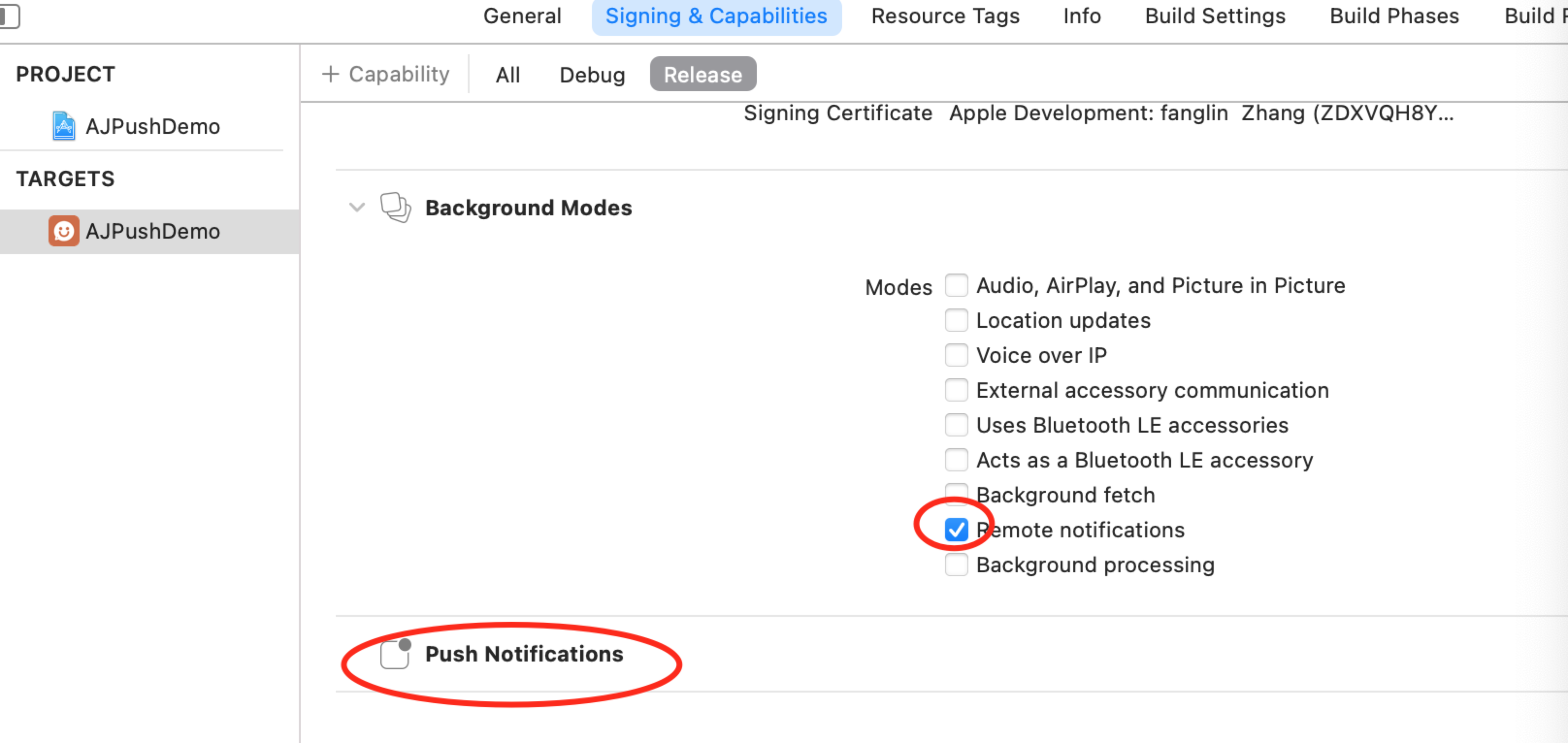
### 应用中权限配置
`Targets-Signing & Capabilities`
### 声音资源存放
`放到工程下,声音名称和Web端配置的声音名需一致`
### 代码说明
#### AppDelegate初始化
```OC
//初始化配置信息
[self initSettingData];
//初始化推送服务
[self initAPNSWithOptions:launchOptions];
//注册 APNs 成功并上报 DeviceToken
- (void)application:(UIApplication *)application didRegisterForRemoteNotificationsWithDeviceToken:(NSData *)deviceToken {
NSLog(@"++application didRegisterForRemoteNotificationsWithDeviceToken");
[[AJPushService shareService] registerDeviceToken:deviceToken withUrl:[SettingManager getAppSpUrl]];
}
//实现注册 APNs 失败接口
- (void)application:(UIApplication *)application didFailToRegisterForRemoteNotificationsWithError:(NSError *)error {
//Optional
NSLog(@"++did Fail To Register For Remote Notifications With Error: %@", error);
}
//初始化配置信息
- (void)initSettingData {
if([SettingManager getJPushKey] == nil) {
[SettingManager setJPushKey:JG_APPKEY];
}
if([SettingManager getAppSpKey] == nil) {
[SettingManager setAppSpKey:APPSP_APPKEY];
}
if ([SettingManager getAppSpUrl] == nil) {
[SettingManager setAppSpUrl:AppSpTestURL];
}
if ([SettingManager getAppSpSecretKey] == nil) {
[SettingManager setAppSpSecretKey:APPSP_SECRETKEY];
}
}
//初始化推送服务
- (void)initAPNSWithOptions:(NSDictionary *)launchOptions {
[[AJPushService shareService] registerJPushOption:launchOptions appKey:[SettingManager getJPushKey] ajAppKey:[SettingManager getAppSpKey] channel:JG_CHANNEL apsForProduction:JG_IS_PRODUCTION];
}
```
#### 接收消息
`ViewController接收`
``` OC
//注册推送通知中心 方法中处理推送操作。
- (void)initNSNotificationCenter {
NSNotificationCenter *defaultCenter = [NSNotificationCenter defaultCenter];
[defaultCenter addObserver:self
selector:@selector(noticeBarMessage:)
name:kAJPushServiceNoticeBarMessageNotification
object:nil];
[defaultCenter addObserver:self
selector:@selector(innerMessage:)
name:kAJPushServiceInnerMessageNotification
object:nil];
[defaultCenter addObserver:self
selector:@selector(customMessage:)
name:kAJPushServiceCustomMessageNotification
object:nil];
}
```
## 集成(Flutter-Android)
### 华为SDK配置(原生)
`在应用 project gradle 中 添加下载华为SDK的配置`
``` json
buildscript {
repositories {
google()
jcenter()
// 添加huawei maven地址
maven { url 'https://developer.huawei.com/repo/' }
}
dependencies {
classpath 'com.android.tools.build:gradle:3.5.2'
//添加依赖
classpath 'com.huawei.agconnect:agcp:1.4.1.300'
}
}
allprojects {
repositories {
google()
jcenter()
// 添加huawei maven地址
maven { url 'https://developer.huawei.com/repo/' }
}
}
task clean(type: Delete) {
delete rootProject.buildDir
}
```
`在应用 module gradle 中 使用插件`
``` json
apply plugin: 'com.huawei.agconnect' //添加华为推送所需配置
```
`在应用 module 的根目录下添加华为推送配置文件agconnect-services.json`
- 在华为开发者平台中下载配置文件“agconnect-services.json”,具体下载地址可查看“推送服务说明-华为”
- 将Android Studio切换到项目视图
- 将“agconnect-services.json”添加到模块根目录下,如下图所示:

### 其他配置(原生)
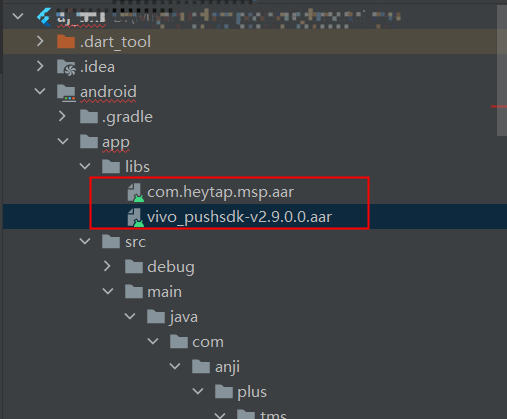
`将com.heytap.msp.aar和vivo_pushsdk-v2.9.0.0.aar放到libs下`
`在module gradle下引用`
```json
//关键
repositories {
flatDir {
dirs 'libs'
}
}
}
flutter {
source '../..'
}
//关键
dependencies {
api fileTree(dir: 'libs', include: ['*.jar'])
api fileTree(dir: 'libs', include: ['*.aar'])
}
```
`在应用 module gradle 中 统一配置AppSp、极光、vivo、小米、oppo `
``` json
.........
//统一配置
manifestPlaceholders = [
"JPUSH_PKGNAME" : applicationId,
"JPUSH_APPKEY" : "66c9266fc53b8025cb0dd919", //极光开发平台上注册的包名对应的appkey.
"JPUSH_CHANNEL" : "developer-default", //暂时填写默认值即可.
"appspHost" : "http://uatappsp.anji-plus.com",//push请求的host
"appspAppKey" : "fb90cb5bc0c84a50883a3a2cc9295fbf",//为移动服务平台申请的appkey
"appspSecretKey": "3cfeb0e9f5fd48fab00b4045a9da1f24",//为移动服务平台申请的appkey
"vivoAppId" : "105303997",//vivo 厂商通道 appID
"vivoAppKey" : "ecaa359c8bbe601d7bbc86d29f5cc58e",//vivo 厂商通道 appKey
"xmAppId" : "\\ 2882303761518880022",//小米 厂商通道 appID,记得如果是长数,前面加“\\ ”,有空格
"xmAppKey" : "\\ 5161888025022",//小米 厂商通道 appKey,记得如果是长数,前面加“\\ ”,有空格
"oppoAppKey" : "c160669462604212962064ffa2df36af",//oppo 厂商通道 appKey
"oppoAppSecret" : "b77b1509f99043e3b695795366e929ef"//oppo 厂商通道 appSecret
]
```
`AndroidManifest.xml配置如下`
```json
```
### 混淆(原生)
1,`module gradle文件加上混淆`
```
buildTypes {
release {
ndk {
abiFilters "armeabi-v7a"
}
//关键代码
proguardFiles getDefaultProguardFile('proguard-android-optimize.txt'), 'proguard-rules.pro'
signingConfig signingConfigs.release
}
debug {
...
}
}
```
2,`proguard-rules.pro加上`
```json
-keep class com.anji.plus.ajpushlibrary.** {*;}
-dontwarn com.anji.plus.ajpushlibrary.**
-keep class com.huawei.** {*;}
-dontwarn com.huawei.**
-keep class cn.jiguang.** {*;}
-dontwarn cn.jiguang.**
-keep class cn.jpush.** {*;}
-dontwarn cn.jpush.**
-keep class com.heytap.** {*;}
-dontwarn com.heytap.**
```
### pubspec.yaml依赖(Flutter)
`push插件我们放在了appsp/sdk/flutter/push`
```yaml
aj_flutter_appsp_push:
git:
url: https://gitee.com/anji-plus/aj_flutter_plugins.git
path: aj_flutter_appsp_push
```
### 安装插件(Flutter)
`flutter packages get`
### 使用(Flutter)
```
import 'dart:convert';
import 'package:aj_flutter_appsp_push/aj_flutter_appsp_push.dart';
///如果不需要播放声音,可自行删减
import 'package:audioplayers/audio_cache.dart';
import 'package:audioplayers/audioplayers.dart';
import 'package:flutter/material.dart';
import 'package:flutter/services.dart';
import 'message_display_second_page.dart';
import 'notification_message_model.dart';
import 'payload_model.dart';
class MessageDisplayPage extends StatefulWidget {
MessageDisplayPage({Key key}) : super(key: key);
@override
State createState() {
return new _MessageDisplayPageState();
}
}
class _MessageDisplayPageState extends State {
String _result = 'getPayloadResult';
AudioCache audioCache = AudioCache();
static OverlayEntry entry;
NotificationMessageModel model;
AjFlutterAppspPush pushPlugin = new AjFlutterAppspPush();
@override
void initState() {
super.initState();
_initPlugin();
}
_initPlugin() async {
try {
pushPlugin.getMessageArrivedCallback((result) {
print('getMessageArrivedCallback getResult ${result}');
setState(() {
_result = result;
});
_convertMessageToModel();
});
} on PlatformException {
print('PlatformException');
}
try {
pushPlugin.getMessageClickCallback((result) {
print('getMessageClickCallback getResult ${result}');
setState(() {
_result = result;
});
_convertMessageToModel();
});
} on PlatformException {
print('PlatformException');
}
}
//弹出对话框
_showaAlertDialog(NotificationMessageModel model) {
entry?.remove();
entry = null;
entry = OverlayEntry(builder: (context) {
return AlertDialog(
title: Text(
model.title ?? "",
style: TextStyle(color: Color(0xFF333333)),
),
content: Text(
model.content ?? "",
style: TextStyle(color: Color(0xFF333333)),
),
actions: [
TextButton(
child: Text(
'取消',
style: TextStyle(color: Color(0xFF5b74FF)),
),
onPressed: () {
entry?.remove();
entry = null;
}),
TextButton(
child: Text(
'确定',
style: TextStyle(color: Color(0xFF5b74FF)),
),
onPressed: () {
entry?.remove();
entry = null;
})
],
);
});
Overlay.of(context).insert(entry);
}
///把透传消息子串转成对象
_convertMessageToModel() {
print('_convertMessageToModel _result $_result');
NotificationMessageModel model = NotificationMessageModel.fromJson(json.decode(_result));
String soundName = json.encode(model.notificationExtras);
soundName = soundName.replaceAll("\\", "");
soundName = soundName.replaceAll("\"{", "{");
soundName = soundName.replaceAll("}\"", "}");
if (soundName != null &&
soundName.isNotEmpty && soundName != "{}") {
PayloadModel payloadModel = PayloadModel.fromJson(json.decode(soundName));
print('payloadModel.sound ${payloadModel.sound}');
String music = payloadModel.sound ?? "";
if (music.isNotEmpty) {
audioCache.play((payloadModel.sound ?? "") + '.mp3',
mode: PlayerMode.LOW_LATENCY);
}
}
print('_convertMessageToModel model $model');
_showaAlertDialog(model);
}
@override
Widget build(BuildContext context) {
print("MessageDisplayPage build ");
return Scaffold(
body: Center(
child: InkWell(
child: Text('当前是演示页面,点击跳转到新页面'),
onTap: () {
Navigator.of(context).push(MaterialPageRoute(
builder: (context) {
return MessageDisplaySecondPage();
},
));
},
)));
}
}
```
### 播放声音(Flutter)
`pubspec.yaml依赖声音播放插件`
```yaml
audioplayers: ^0.16.1
```
`pubspec.yaml配置声音资源`
```yaml
flutter:
# 确保材质图标的字体是包含在您的应用程序中,以便您可以使用的图标
uses-material-design: true
#静态资源 图片 json等
assets:
- assets/
```
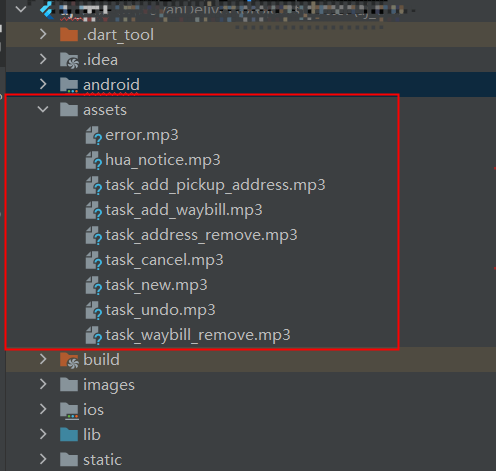
`在assets加入资源文件`
## 集成(Flutter-iOS)
### AJPush.plist的新增和配置(原生)

### 应用中权限配置
`Targets-Signing & Capabilities`

### pubspec.yaml依赖(Flutter)
`push插件我们放在了appsp/sdk/flutter/push`
```yaml
aj_flutter_appsp_push:
git:
url: https://gitee.com/anji-plus/aj_flutter_plugins.git
path: aj_flutter_appsp_push
```
### 安装插件(Flutter)
`flutter packages get`
### 使用(Flutter)
```
import 'dart:convert';
import 'package:aj_flutter_appsp_push/aj_flutter_appsp_push.dart';
///如果不需要播放声音,可自行删减
import 'package:audioplayers/audio_cache.dart';
import 'package:audioplayers/audioplayers.dart';
import 'package:flutter/material.dart';
import 'package:flutter/services.dart';
import 'message_display_second_page.dart';
import 'notification_message_model.dart';
import 'payload_model.dart';
class MessageDisplayPage extends StatefulWidget {
MessageDisplayPage({Key key}) : super(key: key);
@override
State createState() {
return new _MessageDisplayPageState();
}
}
class _MessageDisplayPageState extends State {
String _result = 'getPayloadResult';
AudioCache audioCache = AudioCache();
static OverlayEntry entry;
NotificationMessageModel model;
AjFlutterAppspPush pushPlugin = new AjFlutterAppspPush();
@override
void initState() {
super.initState();
_initPlugin();
}
_initPlugin() async {
try {
pushPlugin.getMessageArrivedCallback((result) {
print('getMessageArrivedCallback getResult ${result}');
setState(() {
_result = result;
});
_convertMessageToModel();
});
} on PlatformException {
print('PlatformException');
}
try {
pushPlugin.getMessageClickCallback((result) {
print('getMessageClickCallback getResult ${result}');
setState(() {
_result = result;
});
_convertMessageToModel();
});
} on PlatformException {
print('PlatformException');
}
}
//弹出对话框
_showaAlertDialog(NotificationMessageModel model) {
entry?.remove();
entry = null;
entry = OverlayEntry(builder: (context) {
return AlertDialog(
title: Text(
model.title ?? "",
style: TextStyle(color: Color(0xFF333333)),
),
content: Text(
model.content ?? "",
style: TextStyle(color: Color(0xFF333333)),
),
actions: [
TextButton(
child: Text(
'取消',
style: TextStyle(color: Color(0xFF5b74FF)),
),
onPressed: () {
entry?.remove();
entry = null;
}),
TextButton(
child: Text(
'确定',
style: TextStyle(color: Color(0xFF5b74FF)),
),
onPressed: () {
entry?.remove();
entry = null;
})
],
);
});
Overlay.of(context).insert(entry);
}
///把透传消息子串转成对象
_convertMessageToModel() {
print('_convertMessageToModel _result $_result');
NotificationMessageModel model = NotificationMessageModel.fromJson(json.decode(_result));
String soundName = json.encode(model.notificationExtras);
soundName = soundName.replaceAll("\\", "");
soundName = soundName.replaceAll("\"{", "{");
soundName = soundName.replaceAll("}\"", "}");
if (soundName != null &&
soundName.isNotEmpty && soundName != "{}") {
PayloadModel payloadModel = PayloadModel.fromJson(json.decode(soundName));
print('payloadModel.sound ${payloadModel.sound}');
String music = payloadModel.sound ?? "";
if (music.isNotEmpty) {
audioCache.play((payloadModel.sound ?? "") + '.mp3',
mode: PlayerMode.LOW_LATENCY);
}
}
print('_convertMessageToModel model $model');
_showaAlertDialog(model);
}
@override
Widget build(BuildContext context) {
print("MessageDisplayPage build ");
return Scaffold(
body: Center(
child: InkWell(
child: Text('当前是演示页面,点击跳转到新页面'),
onTap: () {
Navigator.of(context).push(MaterialPageRoute(
builder: (context) {
return MessageDisplaySecondPage();
},
));
},
)));
}
}
```
### 播放声音(Flutter)
`pubspec.yaml依赖声音播放插件`
```yaml
audioplayers: ^0.16.1
```
`pubspec.yaml配置声音资源`
```yaml
flutter:
# 确保材质图标的字体是包含在您的应用程序中,以便您可以使用的图标
uses-material-design: true
#静态资源 图片 json等
assets:
- assets/
```
`在assets加入资源文件`
